
The short answer: enable Auto-Translation in enhancements, press your hotkey (⌃+⌥+R on Mac, Ctrl+Alt+R on Windows/Linux) or tap the mic on mobile, speak in any of 99 languages, and AICHE outputs clean English ready to paste into Claude, ChatGPT, or any AI assistant. Available on every AICHE platform.
Thinking in your native language but typing prompts in English creates mental translation overhead that slows you down and produces awkward phrasing.
How It Works
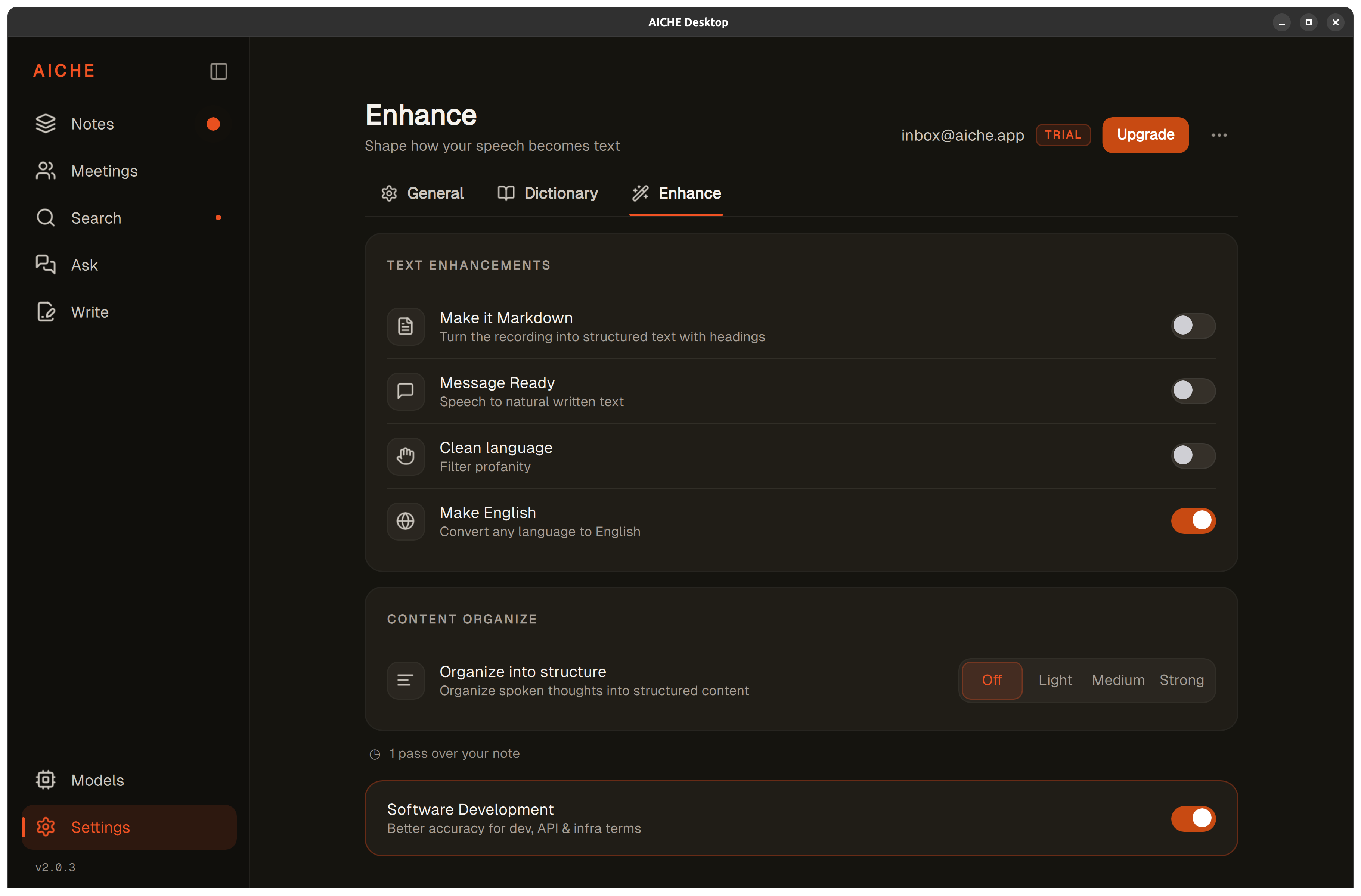
- Open AICHE and click the Enhance tab.
- Enable Auto-Translation and select "English" as target language.
- Press your recording hotkey (or tap the mic on iPhone, iPad, Apple Watch, or Android) and speak naturally in any of 99 supported languages.
- AICHE transcribes your speech, translates to fluent English, and inserts the text at your cursor (desktop, Chrome, Obsidian) or saves it to your note (mobile).
- Paste directly into Claude, Cursor, ChatGPT, or Gemini. No mental translation required.
The hidden advantage: AI models work on tokens. Non-English text consumes 30-50% more tokens than English for the same meaning. Polish uses nearly twice as many tokens. Chinese, Japanese, and Arabic are similarly expensive. By translating to English before sending to AI, you get faster responses, lower API costs, and better output quality. AI models have larger English training corpora and perform best in English.
Heads-up: Auto-Translation adds 2-3 seconds to processing time. For quick notes in your native language where translation isn't needed, disable it for faster results.
The pro-tip: if you can read English but prefer thinking in your native language, this is a useful pairing. Speak Polish, Hindi, or Arabic naturally, get English prompts for AI, read English responses. You think faster, AI responds better, and token costs drop 30-50%.
The Token Economy Advantage
AI models process text in tokens - chunks of characters that vary in size by language. English is the most token-efficient language for most AI models because their tokenizers are optimized for English text. Non-English languages consume significantly more tokens for the same semantic content.
For example, a 100-word technical explanation in Polish might consume 180-200 tokens. The same meaning expressed in English consumes 110-130 tokens. This difference matters in three ways:
Faster responses. Fewer input tokens means the AI model processes your prompt faster. For long, detailed prompts, this saves 2-5 seconds of response time.
Lower API costs. If you use AI APIs directly (Claude API, OpenAI API), you pay per token. Sending English instead of Polish, Chinese, or Arabic can reduce prompt costs by 30-50%.
Better output quality. AI models have vastly larger English training corpora. They understand nuance, technical terminology, and context better in English. A complex architecture question in English produces a more accurate, detailed response than the same question in most other languages.
Auto-Translation lets you think in your strongest language while giving AI models their strongest language. Both sides operate at peak performance.
How Translation Works in the Pipeline
Auto-Translation runs after transcription and before text insertion. The pipeline is:
- Whisper transcribes your speech in the original language.
- Auto-Translation converts the transcription to English.
- AI cleanup and other enhancements process the English text - filler words removed, punctuation and paragraph breaks added.
- The final English text inserts at your cursor (desktop, Chrome, Obsidian) or saves to your note (mobile).
This order matters because AI cleanup works best on English text. By translating first, every downstream enhancement operates on its optimal input language. Total round trip is roughly 3 seconds for 15 minutes of audio, plus the 2-3 seconds Auto-Translation adds on top.
Use Cases for Multilingual Teams
International Development Teams
A team with developers in Warsaw, Bangalore, and Tokyo can each speak their native language into AICHE and produce English prompts for shared AI tools. Code reviews, architecture discussions, and documentation all happen in English without anyone needing to mentally translate while speaking.
Non-Native English Speakers Using AI Coding Tools
If you learned to code in English but think about problems in your native language, translation removes a cognitive step. Describe the bug in Portuguese, explain the architecture in Korean, request a refactor in German - AICHE delivers fluent English prompts that Claude, Cursor, or ChatGPT responds to with full understanding.
Client Communication Across Languages
Dictate a client update in your native language, get English text, then paste into an email or Slack message. The output reads naturally because AICHE's translation produces fluent English, not word-for-word translation. Idioms and cultural phrasings adapt to their English equivalents.
Documentation in English-First Codebases
Even if your team speaks multiple languages internally, code documentation needs to be in English for global contributor accessibility. Speak your documentation in any language, get English README content, code comments, and API descriptions.
Translation Quality
AICHE's translation layer produces fluent, natural English - not the stilted output of word-for-word machine translation. Technical terms translate correctly because the AI understands domain context: "base de datos" becomes "database," not "base of data."
Proper nouns (names, company names, product names) pass through untranslated, preserving them exactly as spoken. Technical jargon that exists in English (API, server, deploy, commit) is preserved in its English form regardless of the source language.
What You Get
- 99 input languages. Same engine on desktop and mobile. Speak in any of them, ship clean English.
- Available on every platform. macOS, Windows, Linux (.deb, .rpm, AppImage, Flatpak), iPhone, iPad, Apple Watch, Android, Chrome extension, Obsidian plugin. 9 platforms + REST API. The mobile UI is localized into 28 languages with 450+ strings per locale, including Arabic and Hebrew RTL.
- AI cleanup on the English output. Filler words removed, punctuation and paragraph breaks added.
- Custom vocabulary. 50 entries per user for names, brands, and jargon you use often, applied on every recording.
- Software Development profile (Pro). Recognition tuned for code, APIs, CLI flags, library names, developer jargon.
- Speed. ~3 seconds for 15 minutes of audio (Auto-Translation adds 2-3 seconds on top). Sub-100ms cold start on iOS.
- Zero-retention audio. Streamed to Groq, Google Generative AI, or DeepInfra, processed in seconds, discarded after processing. No copy kept on our servers.
- Encryption. Cloud sync is opt-in and AES-256-GCM at rest with an Argon2id-derived key. Modern TLS in transit (TLS 1.3 where the OS supports it), with certificate pinning on iOS and Android.
- Privacy-first analytics. Diagnostics are user-initiated only on desktop (manual "Send Diagnostic Report" or the OS-level crash share). Mobile uses Firebase Analytics for sign-in and subscription events only - your transcription content, recordings, and sharing behavior never enter our analytics pipeline. Android explicitly omits the AD_ID permission.
Personal is $4.99/mo monthly or $3.99/mo on annual. Pro is $9.99/mo monthly or $8.33/mo on annual. From $3.99/mo with a 7-day free trial, no credit card. See pricing.
Result: you explain a complex architecture decision in Polish while walking around your desk (90 seconds speaking). Auto-Translation delivers 140 words of fluent English ready to paste into Claude. Claude responds with better quality because it received English context using 40% fewer tokens than if you'd sent Polish.
Works With
Auto-Translation is especially useful for AI tools that expect English input:
- Claude Code - think in your language, ship English prompts
- Cursor - architecture prompts in your native language
- ChatGPT - English prompts without mental translation
- Slack - reply to English-speaking teammates in your language
Do this now: enable Auto-Translation, press your hotkey (or tap the mic on mobile), speak 2-3 sentences in your native language, and watch AICHE return clean English text.