
The short answer: enable AI cleanup once, then speak naturally. AICHE removes filler words and stutters, adds punctuation and paragraph breaks, and (optionally) strips profanity, so the text that lands at your cursor is ready to send.
Raw transcription is not finished text. Speech has "um", "uh", "like", false starts, and mid-sentence restarts. Punctuation drifts. Paragraphs don't exist. If you ship raw output to a colleague, you'll edit it before they read it. AI cleanup runs that edit pass for you in roughly 3 seconds.
How It Works
- Open AICHE and click the Enhance tab to access text enhancements.
- Enable AI cleanup. Optionally toggle the profanity filter on top of it.
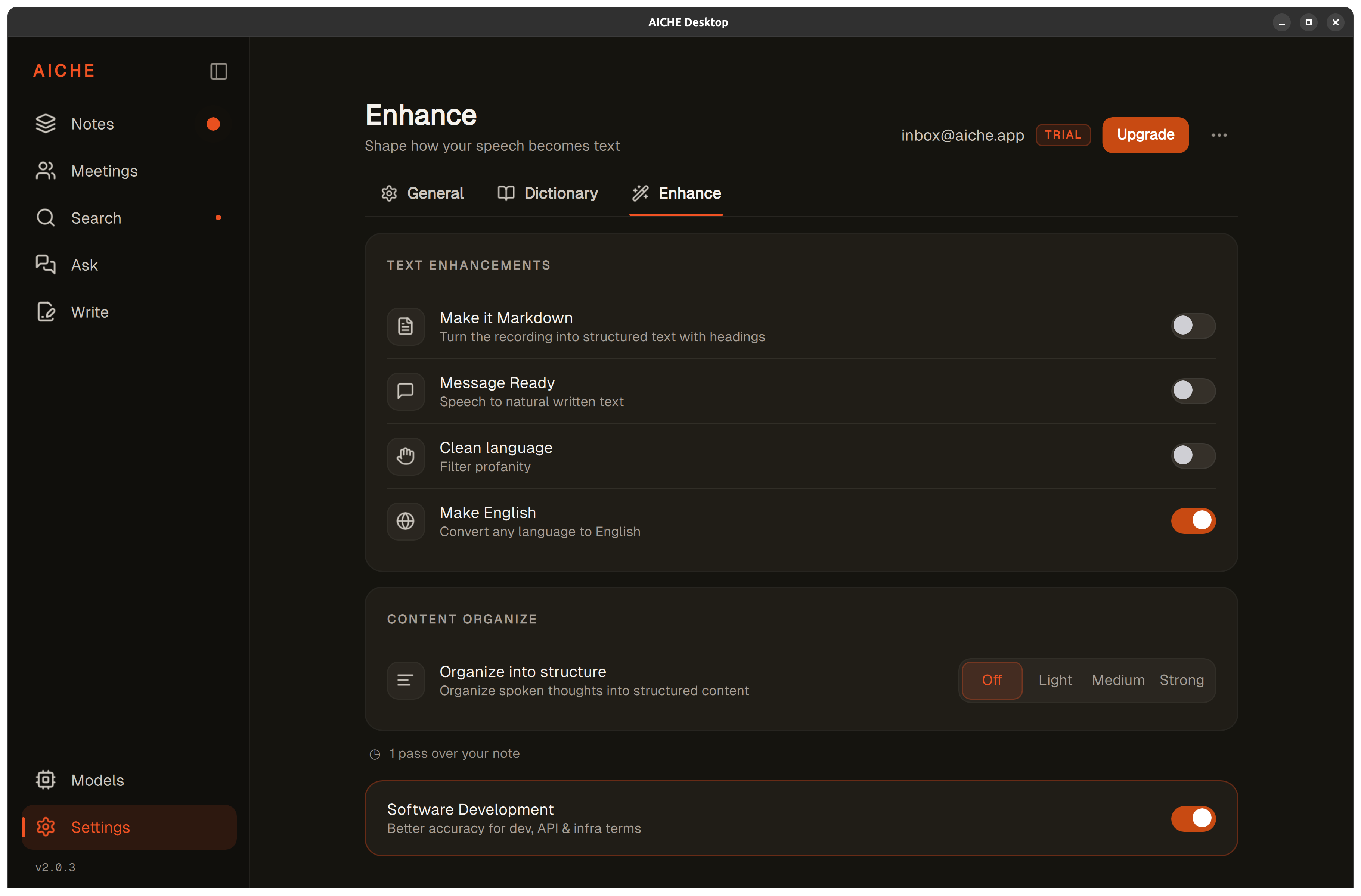
- Press your hotkey (⌃+⌥+R on Mac, Ctrl+Alt+R on Windows/Linux) and speak naturally. Ramble, restart sentences, swear at the bug.
- Press the hotkey again to stop. AICHE transcribes, runs the cleanup pipeline, and inserts polished text at your cursor.
- Continue working. No copy-paste, no editing pass.
Heads-up: AI cleanup preserves your voice. "This function breaks everything" stays direct. Filler and profanity get cut; the technical content and tone do not.
The pro-tip: AI cleanup pairs with auto-categorization, custom vocabulary, and (Pro) the Software Development profile. Together they handle filler, structure, jargon spelling, and code-adjacent terms in one pass.
What AI Cleanup Actually Does
AI cleanup is the polish pipeline that runs after Whisper transcribes your audio. It's a multi-stage pass, not a single filter:
Filler-word and stutter removal. "Um", "uh", "like", false starts, and mid-sentence restarts get stripped without losing the actual content.
Punctuation and paragraph normalization. Speech rhythm gets mapped to written sentence boundaries. Periods, commas, question marks, and paragraph breaks land where they belong.
Hallucination filter. Empirical dictionaries built from millions of recordings catch known Whisper failure patterns (phantom "thanks for watching", random "subscribe" insertions) before they reach you.
Custom vocabulary enforcement. Your 50-entry dictionary (names, brands, internal jargon, code identifiers) gets applied so misspelled technical terms get corrected on every recording.
Profanity filter (optional). Toggle this on if you want common swear words removed. The sentence restructures naturally without placeholder characters or awkward gaps. "Who the hell wrote this code" becomes "Who wrote this code." The question stays pointed; the language stays workplace-appropriate.
Fast LLM polish via Groq, Google Generative AI, or DeepInfra. The cleaned text passes through a fast LLM for grammatical smoothing. Zero retention: the call doesn't log, doesn't train, doesn't store. Total pipeline time is around 3 seconds for 15 minutes of audio.
When to Lean on Cleanup
Bug Reports and Incident Response
Production outages produce the most colorful language. You're under pressure, systems are failing, and you need to communicate the problem to your team. Speak exactly what you're thinking. Cleanup handles the filler, the punctuation, and (with the profanity filter on) the heat, while the technical details come through intact.
Client-Facing Communication
Email responses after a frustrating interaction benefit from cleanup as a safety net. Even if you don't expect to swear, the filter catches heated phrasing that might slip through when you're emotionally invested in a problem.
Shared Slack Channels
Channels with external partners, contractors, or executives require professional tone. AI cleanup keeps your rapid-fire voice-dictated messages workplace-appropriate without slowing you down to self-censor each line.
Team Standup Notes
When you're talking quickly through blockers, cleanup catches the filler and (optionally) the language that shouldn't end up in a meeting summary shared with management.
What Cleanup Preserves
AI cleanup is a polish layer, not a tone rewriter. It targets filler, punctuation, structure, and (optionally) profanity. It leaves your voice intact - direct, opinionated, critical when warranted. Say "This code is terrible and needs to be rewritten from scratch," and that's exactly what appears, because directness is part of professional communication.
Opinions, criticism, and negative feedback pass through untouched. Constructive criticism stays constructive; cleanup only removes the parts you would have edited out yourself.
What You Get
- AI cleanup on every recording. Filler words removed, stutters dropped, punctuation and paragraph breaks added.
- Optional profanity filter. Toggle on for Slack, email, and shared docs. Toggle off when casual tone is fine.
- Auto-categorization. Notes group into topics like Work, Ideas, or Life automatically.
- Custom vocabulary. 50 entries per user for names, brands, and jargon you use often.
- Software Development profile (Pro). Recognition tuned for code, APIs, CLI flags, library names.
- 99 transcription languages. Same engine on desktop and mobile. Mobile UI is localized to 28 languages; desktop, Chrome, and Obsidian remain English-only.
- Zero-retention audio. Streamed to Groq, Google Generative AI, or DeepInfra, processed, and discarded after processing. Cloud sync is opt-in and AES-256-GCM encrypted with an Argon2id-derived key. Modern TLS in transit.
- Privacy-first analytics. Diagnostics are user-initiated only - send a report when you choose to, with the context you choose to share.
Personal is $4.99/mo monthly or $3.99/mo on annual. Pro is $9.99/mo monthly or $8.33/mo on annual. From $3.99/mo with a 7-day free trial, no credit card. See pricing.
Result: you spend 90 seconds ranting about a production bug while pacing around your desk. AI cleanup delivers a professional explanation ready to send to your team, capturing your technical analysis without the filler or the expletives.
Do this now: enable AI cleanup, press your hotkey (⌃+⌥+R or Ctrl+Alt+R), and dictate a paragraph with deliberate filler words and restarts. Watch the text land clean, punctuated, and ready to send.