
The short answer: if anything fails between hitting the hotkey and getting clean text (network drop, app crash, server error, subscription lapse, offline by design), AICHE keeps the recording in an encrypted Later queue and resumes processing the moment conditions allow. Auto-resume is on by default; you can also process the queue manually.
Dictating a 5-minute technical specification, clicking send, seeing "Connection error" and watching your recording vanish destroys flow state and forces you to recreate complex ideas from memory. Most voice apps drop one or two of every ten attempts. The cost is not the lost minutes, it is the lost flow state you cannot reproduce in a second take. AICHE removes that failure class.
How It Works
- Press your hotkey (⌃+⌥+R on Mac, Ctrl+Alt+R on Windows/Linux) or tap the mic on iPhone, iPad, Apple Watch, or Android. AICHE records audio locally, encrypted on disk.
- When you stop, AICHE streams the audio to Groq, Google Generative AI, or DeepInfra for transcription. Typical recordings finish in about 3 seconds for 15 minutes of audio; audio is discarded after processing.
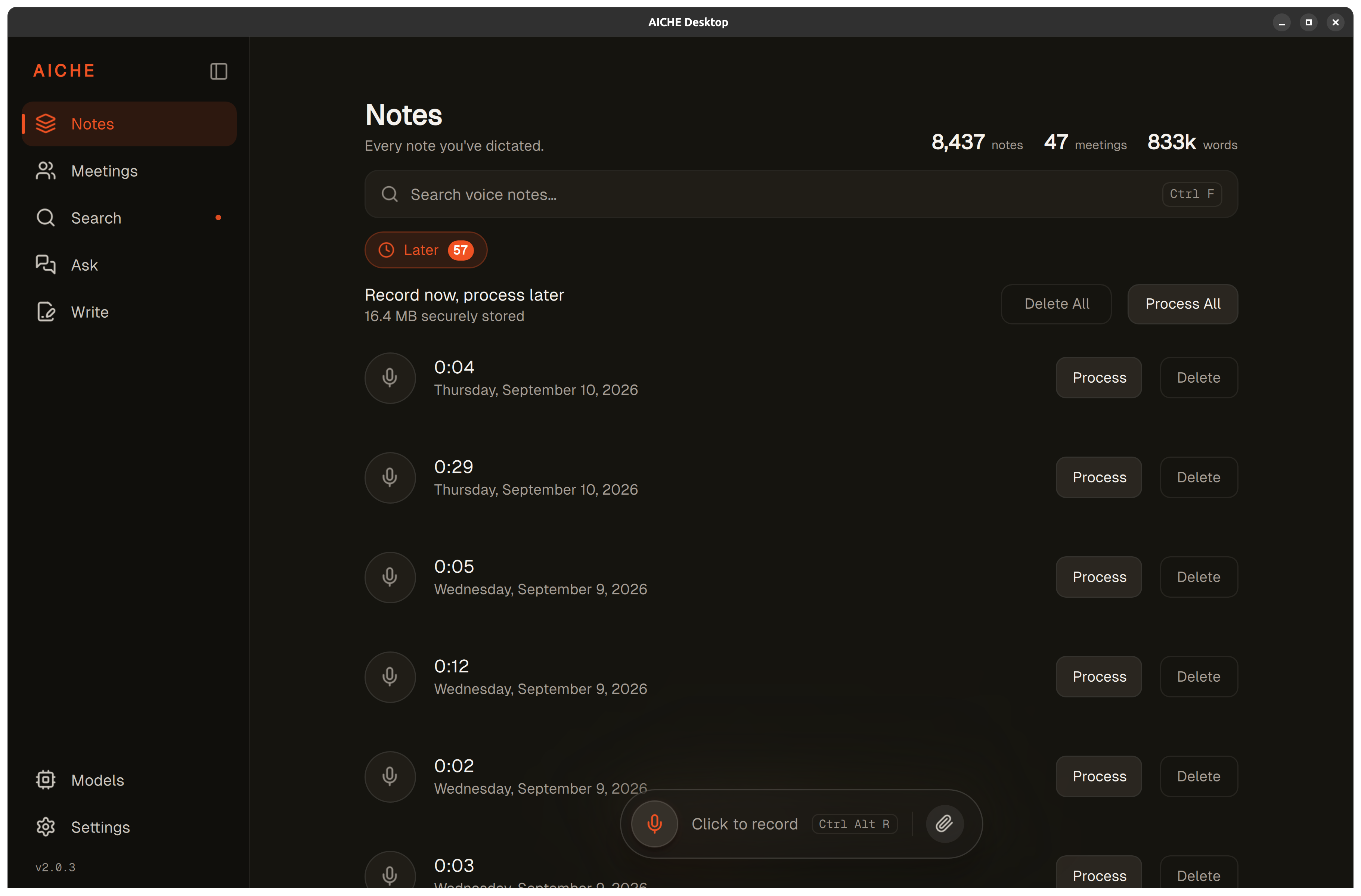
- If anything fails (network drop, server error, app crash, expired subscription, logged-out session), the encrypted recording drops into the Later queue instead of disappearing.
- The moment a connection returns, the queue processes automatically. If you prefer manual control, switch to manual mode and tap Process when you choose.
- Subscription lapsed mid-recording? The audio stays encrypted locally. Renew, and the queue picks up where it left off.
- Session expired? Re-authenticate. The encrypted audio is still there waiting.
- The encrypted file is not playable by copying it off disk. Cloud sync uses AES-256-GCM with an Argon2id-derived key. On iPhone, iPad, and Apple Watch, local storage uses iOS Data Protection and the iOS Keychain for key material - the same protection that secures Messages, Mail, and Photos. On Mac, local storage uses an AES-256-GCM secure store with keys hardware-bound to the device. On Android, the Later queue sits in Android's file-based encryption (AES-256) with keys backed by Android Keystore via AndroidX Security. Even if someone grabs the file, it stays unplayable outside AICHE on the device that wrote it.
Heads-up: this is broader than offline mode. Offline by design handles "no internet, on purpose" (a plane, the subway, a basement). The Later queue also protects against server failures, subscription lapses, authentication resets, and any other failure scenario. Your content is never deleted due to technical problems.
The pro-tip: the Later queue shows exactly how many recordings are waiting and how much space they occupy. With auto-resume on, the queue drains itself the moment the network returns. With manual mode, one tap on Process clears everything. No need to retry each recording individually.
How Retry and Auto-Resume Work
When a transcription attempt fails, AICHE doesn't give up and doesn't drop the audio. The retry strategy:
First retry: Immediate, within 1 second. Handles transient network blips that resolve instantly.
Second retry: After 2-3 seconds with a fresh connection attempt. Handles brief server-side issues or temporary DNS failures.
Third retry: After 5-10 seconds. If the server is under load or temporarily unavailable, this delay gives it time to recover.
If retries fail (or the device was offline from the start), the recording moves to the Later queue, encrypted on disk. Auto-resume is on by default: as soon as the network returns and your session is valid, the queue processes itself in the background. Switch to manual mode if you'd rather control when uploads happen (useful while tethered or roaming). The recording persists locally until it processes or you delete it.
What Failures Look Like
AICHE handles failures transparently - you see what happened and what action was taken.
Network Failures
WiFi drops, cellular dead zones, VPN disconnections. You see a brief notification that processing is queued, and the recording appears in Later. With auto-resume on, recordings upload as soon as connectivity returns. Switch to manual mode if you'd rather choose the moment (handy while roaming or tethered).
Offline by Design
On a plane, in the subway, in a basement: press the hotkey or tap the mic, speak, stop. The recording is saved locally, encrypted on disk, with the same hotkey, same workflow, same eventual output as online use. The queue drains automatically the next time you have signal.
Server Errors
If AICHE's servers are temporarily unavailable (maintenance, scaling events, regional outages), the retry mechanism handles short outages silently. For longer outages, recordings queue locally and process when servers return. You're never blocked from recording, only transcription waits.
App Crashes
If AICHE force-quits or the app crashes mid-recording, the audio and any partial transcript drop into the Later queue. On the next launch, they finish processing automatically.
Subscription Lapses
If your subscription expires mid-session, recordings already captured are preserved in encrypted local storage. When you renew, the Later queue processes everything that accumulated during the lapse. No recordings are lost because of billing status changes.
Authentication Timeouts
Long-running sessions may occasionally require re-authentication. If a transcription attempt fails because your session expired, AICHE preserves the recording and prompts you to log in again. After re-authenticating, the queued recording processes immediately.
The Later Queue in Detail
The Later queue is your safety net for all failure scenarios. It shows:
- Recording count. How many unprocessed recordings are waiting
- Total storage used. Combined size of all queued audio files
- Individual timestamps. When each recording was captured, so you can identify them by time
- Status indicators. Whether each recording is queued, retrying, or waiting for connectivity
You can let auto-resume drain the queue on its own, process the whole thing at once with "Process All," or pick individual recordings in any order. Processing applies all your current settings (AI cleanup, Auto-categorization, custom vocabulary, Software Development profile on Pro) - the same quality as if you'd recorded online.
Why This Matters for Professional Use
In professional contexts, losing a recording isn't just an inconvenience, it's lost work product. A 90-second dictation of meeting action items, a detailed bug report spoken while debugging, or a client response drafted while commuting represents real effort that can't be easily recreated.
Most voice dictation tools treat failed transcriptions as disposable. If the server doesn't respond, the audio disappears. AICHE treats every recording as something to preserve until it processes cleanly, regardless of what goes wrong in between. The architectural reason: AICHE never needs to transcribe in real time. The recording is yours from the moment you stop speaking, and processing happens whenever conditions allow.
What You Get
- Encrypted Later queue. Audio stays on the device, encrypted at rest, until it processes or you delete it.
- Auto-resume on reconnect. Queue drains itself the moment network and session return. Manual mode available.
- Failure classes covered. Network drops, app crashes, server errors, subscription lapses, authentication timeouts, offline by design.
- AI cleanup. Filler words removed, punctuation and paragraph breaks added on every recording, online or queued.
- Auto-categorization. Notes group into topics like Work, Ideas, or Life automatically.
- Custom vocabulary. 50 entries per user for names, brands, and jargon you use often.
- 99 transcription languages. Same engine on desktop and mobile. Mobile UI is localized to 28 languages (including Hebrew, Arabic with full RTL, plus Japanese, Korean, Chinese, Hindi, Thai, Vietnamese, and more); desktop, Chrome, and Obsidian remain English-only.
- Zero-retention audio. Audio is streamed to Groq, Google Generative AI, or DeepInfra, processed, and discarded after processing. Cloud sync is opt-in and AES-256-GCM encrypted with an Argon2id-derived key. Modern TLS in transit (TLS 1.3 where the OS supports it).
- Privacy-first analytics. We track sign-in events and subscription conversions via Firebase Analytics on mobile. We do NOT track your transcription content, recordings, or sharing behavior. No audio or text enters our analytics pipeline. Desktop has no automatic telemetry; diagnostics are user-initiated only (OS-level "share with developer" after a crash, or a manual "Send Diagnostic Report").
- 9 platforms + REST API (Pro). macOS, Windows, Linux (.deb, .rpm, AppImage, Flatpak), iPhone, iPad, Apple Watch, Android, Chrome extension, Obsidian plugin.
Personal is $4.99/mo monthly or $3.99/mo on annual. Pro is $9.99/mo monthly or $8.33/mo on annual. From $3.99/mo with a 7-day free trial, no credit card. See pricing.
Result: you dictate 8 voice notes during a subway commute with spotty connection. Three fail to process immediately due to network interruptions. All 8 recordings are safely encrypted locally. When you reach your destination with stable internet, the queue resumes on its own and the transcriptions complete in seconds.
Do this now: record a voice note, then immediately turn off your internet connection or close AICHE mid-processing. Your recording will appear in the Later queue, encrypted and protected, ready to process when you restore connection.