
The short answer: AICHE is cloud-default, with a local encrypted queue for the moments network isn't available. Press ⌃+⌥+R (Mac) or Ctrl+Alt+R (Windows/Linux) with no connection, AICHE saves the audio locally and encrypted, and the queue processes automatically when connectivity returns.
Airport WiFi drops mid-dictation. Coffee shop internet dies. Your home connection goes down while you're capturing ideas. The job of a voice-typing layer is to make capturing a thought independent of the conditions you happen to be in - so losing recordings to connectivity isn't acceptable.
AICHE is cloud-default: the desktop apps stream audio to named cloud transcription providers (Groq, Google Generative AI, or DeepInfra), process it server-side in seconds, and discard it after processing. When the network isn't there, your recording is still yours - it lands in the Later queue, encrypted on disk, and processes the moment connectivity returns.
How It Works
- Press your recording hotkey (⌃+⌥+R on Mac, Ctrl+Alt+R on Windows/Linux). Recording is toggle, not push-to-talk. If there's no connection, AICHE routes the recording to the local Later queue automatically.
- Speak as long as you need. There's no length cap. AICHE saves the audio to your local encrypted database while you talk.
- The Later panel shows queued items and storage used (typically 2-5 MB per minute of audio).
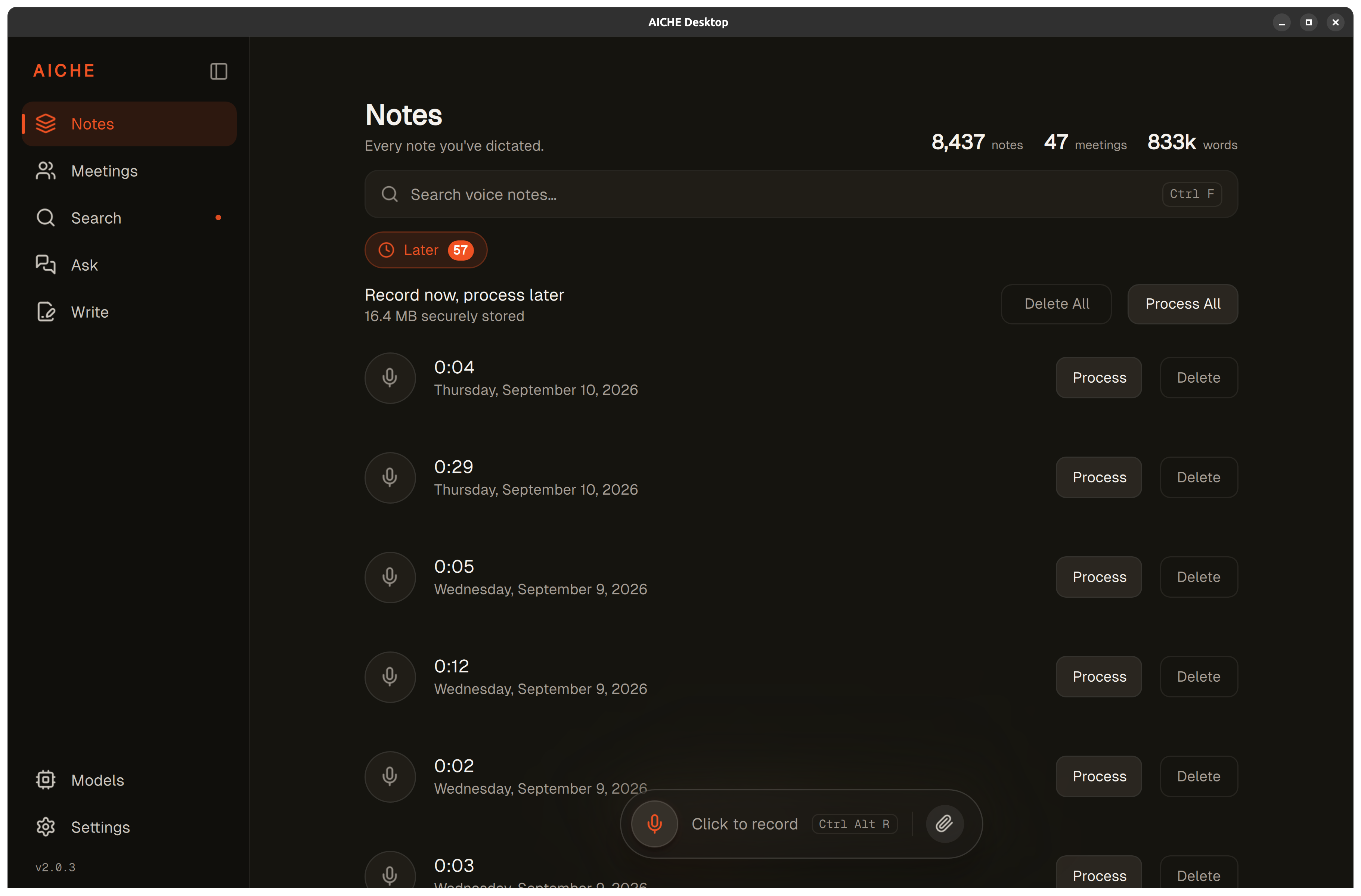
- When internet returns, AICHE auto-processes the queue in the background, or you can click "Process All" for a manual trigger.
- Each recording processes in roughly 3 seconds for 15 minutes of audio, with progress indicators per item in the queue.
- All transcriptions appear in your History with original timestamps preserved.
Heads-up: Later recordings are encrypted with AES-256-GCM at rest but consume local disk space. A 10-minute recording uses approximately 20-50 MB. Check the Later panel's storage indicator if you record extensively offline.
The pro-tip: the Later queue is built for airplane work. Record 20-30 voice notes during a flight, land, connect to airport WiFi, and the queue processes in the background while you walk to baggage claim.
How the Later Queue Works
When you press the hotkey without an internet connection, AICHE detects the missing network within milliseconds and routes the recording to the Later queue. The recording proceeds identically to online use - same audio quality, no length cap, same hotkey controls. The only difference is what happens after you stop recording.
Instead of streaming audio to Groq, Google Generative AI, or DeepInfra for transcription right away, AICHE saves the compressed audio to an encrypted local database. Each recording gets a timestamp and appears in the Later panel with a "Queued" status. You can keep recording - each new note stacks in the queue.
When internet returns, the queue processes automatically in the background. You can also click "Process All" to kick everything off at once, or click individual recordings to process selectively. Processing applies all your configured enhancements (AI cleanup, auto-categorization, custom vocabulary, Software Development profile, auto-translation to English) exactly as if you'd recorded online.
When the Later Queue Kicks In
AICHE checks connectivity before each transcription attempt, not continuously. This means:
Complete offline. No WiFi, airplane mode, remote location - AICHE detects this and queues everything to Later.
Intermittent connectivity. Subway, rural areas, congested conference WiFi - if the connection drops during a transcription attempt, AICHE retries automatically, then queues the recording if retries fail. No data is lost.
VPN or firewall blocks. Corporate networks that block AICHE's servers trigger the same path as no connectivity. The recording queues locally until you're on an unrestricted network.
App crash, subscription lapse, server error. Same posture. The audio drops into the Later queue and finishes processing when conditions allow. The recording is yours from the moment you stop speaking; no failure mode silently loses it.
Practical Scenarios
Airplane Work Sessions
Record voice notes during a 3-hour flight - ideas, meeting prep, email drafts, to-do items. A typical flight session produces 15-25 recordings using 30-75 MB of local storage. When you land and connect to WiFi, the entire queue processes in under 2 minutes. You walk off the plane with 15-25 polished text notes ready to paste into email, Slack, or documents.
Commuting Without Data
Train tunnels, subway systems, and rural stretches with no cell signal are prime dictation time. Record thoughts during connectivity gaps and let them process automatically when signal returns. You don't need to manually switch modes or check connectivity status - the transition is automatic.
Remote and Outdoor Work
Hiking, camping trips, or working from a cabin without reliable internet. Capture ideas whenever they strike. The Later queue holds recordings indefinitely until you're back online - there's no expiration on queued items.
Conference and Event Notes
Large conferences often have overloaded WiFi. Record session takeaways, contact notes, and action items between talks without worrying about network reliability. Process everything in your hotel room at the end of the day.
Storage and Encryption
Later recordings are stored with AES-256-GCM encryption on your device. On Mac, the encryption key is hardware-bound to your machine - the audio files cannot be played by copying them off your device, they're unreadable without AICHE's decryption running on the same hardware.
Storage usage depends on recording length and audio quality. A 60-second recording typically uses 2-5 MB. The Later panel displays total storage used, so you can monitor space consumption during extended offline sessions.
There's no limit to how many recordings you can queue, but available disk space is the practical constraint. On a device with 1 GB of free space, you can store roughly 200-500 one-minute recordings before needing to process or free space.
What You Get
- Local encrypted queue. Recordings stored on disk with AES-256-GCM. On Mac, the key is bound to the machine's hardware UUID, so copied files won't play on another device.
- Auto-resume when connectivity returns. No manual mode-switching. Auto-process by default, manual "Process All" available.
- Same pipeline online or queued. AI cleanup, auto-categorization, custom vocabulary, Software Development profile (Pro), auto-translation to English - all applied identically.
- 99 transcription languages. Same engine on desktop and mobile. Mobile UI is localized to 28 languages; desktop, Chrome, and Obsidian remain English only.
- audio purge after processing. Audio is streamed to Groq, Google Generative AI, or DeepInfra, processed, and discarded after processing. Cloud sync of transcripts is opt-in, AES-256-GCM with an Argon2id-derived key, modern TLS in transit.
- No desktop telemetry. No analytics SDK silently shipping usage data. Diagnostics are user-initiated only - the OS-level "share with developer" prompt after a crash, or a manual "Send Diagnostic Report" button.
- Available on 9 platforms + REST API (Pro). macOS, Windows, Linux (.deb, .rpm, AppImage, Flatpak), iPhone, iPad, Apple Watch, Android, Chrome extension, Obsidian plugin.
Personal is $4.99/mo monthly or $3.99/mo on annual. Pro is $9.99/mo monthly or $8.33/mo on annual. From $3.99/mo with a 7-day free trial, no credit card. See pricing.
Result: you capture 15 ideas during a 2-hour train ride with spotty connectivity. When you reach WiFi, AICHE processes all 15 recordings in roughly 45 seconds, giving you 15 polished text notes ready to use.
Do this now: turn off WiFi, press your hotkey, record a test message, and watch it land in the Later queue. Reconnect and the queue processes on its own (or click "Process All" to trigger it manually).