
The short answer: press Ctrl+H to open History, search through every past transcription by keyword or date, click any note to copy or delete it, and read your usage stats (total notes, words transcribed, current streak) at the top of the same panel.
Transcribing 20-30 voice notes a day produces content that disappears unless you save it manually. Hunting through Slack or email for "that thing I dictated last Tuesday" wastes 5-10 minutes per search. History fixes that.
How It Works
- Press Ctrl+H (or click History in AICHE) to open the History panel.
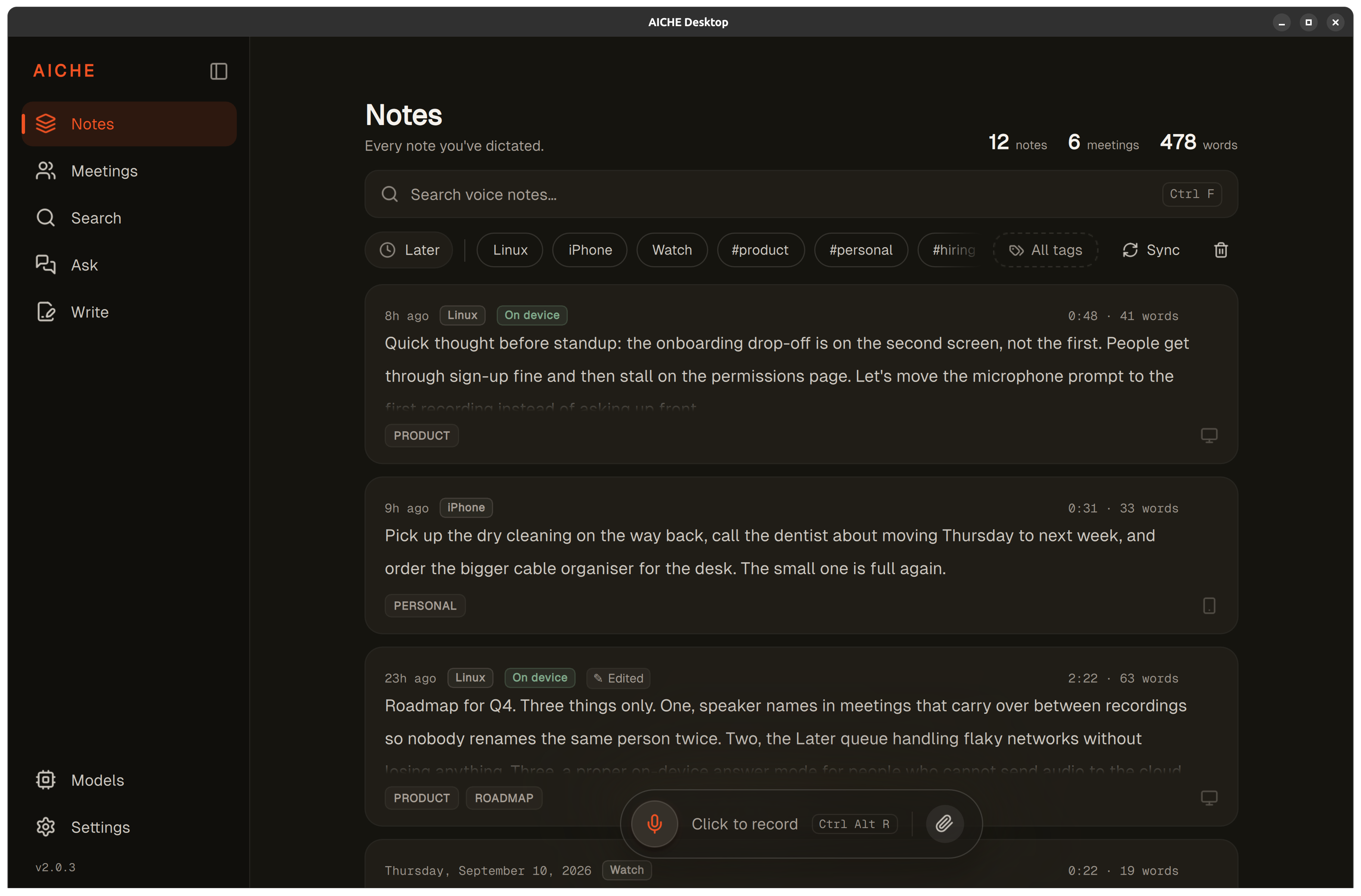
- View all transcriptions sorted by date (newest first) with timestamps and word counts.
- Use the search box to find notes by content. Type keywords and History filters instantly.
- Click any note to view full text, copy to clipboard, or delete permanently.
- Read total voice notes, words transcribed, and current streak in the stats area at the top of the History panel.
- History stores transcriptions locally in an AES-256-GCM encrypted database. Your notes never leave your device unless you opt in to Cloud Sync.
Heads-up: History stores everything by default, but you control retention. Set auto-delete to 7, 30, 90 days, or forever in Settings - older notes clean themselves up on the schedule you choose. You can also delete any individual note at any time.
The pro-tip: History search works across all text, not just titles. Search for project names, people, or topics to instantly find related notes from weeks ago. Faster than searching email or Slack archives.
Using Search Effectively
History search operates on the full text of every transcription, not just timestamps or metadata. Type any keyword or phrase into the search box and results filter instantly - no waiting for indexing or server queries because everything is stored locally.
Search by topic. Looking for everything you said about a specific project? Search the project name. Every dictation mentioning it appears in chronological order, giving you a complete spoken record of your thoughts on that topic.
Search by person. Type a colleague's name to find every voice note that references them - meeting notes, action items, feedback you dictated after a conversation.
Search by date. The History panel sorts by date, so scrolling finds recent notes quickly. For older content, combine keyword search with visual scanning of timestamps.
Partial matching. Search finds partial words, so "deploy" matches "deployment," "deploying," and "deployed." This catches variations in how you spoke about the same topic across different sessions.
Filter by device source. Recordings carry the device they came from. Filter chips let you narrow History to notes captured on your Mac, your iPhone, your iPad, your Apple Watch, your Android phone, Windows, Linux, or anything that synced down from the cloud. Handy when you want only the meeting summaries you dictated on the laptop, or only the walking ideas you captured from the Watch.
Month-view calendar. Switch to the calendar view to see your dictation activity laid out by month, with dots marking each day that has recordings. First day of the week follows your system locale. Tap a day to see every note from that date.
What Statistics Track
The stats area inside the History panel summarizes your voice dictation patterns:
Total notes. Lifetime count of all transcriptions created through AICHE. This number only goes up - deleted notes are removed from History but the count preserves your total usage.
Words transcribed. Cumulative word count across all dictations. A useful measure of how much typing you've replaced with voice - 50,000 words transcribed represents roughly 25-30 hours of typing saved.
Current streak. Consecutive days you've used AICHE for at least one dictation. Streaks motivate consistent usage, and consistent usage builds the muscle memory that makes voice dictation feel natural.
Daily average. Words transcribed per active day, helping you understand your typical usage pattern. Most active users average 500-2,000 words per day.
History as a Personal Knowledge Base
Over weeks and months of dictation, History becomes an unexpectedly valuable archive. Ideas you captured while walking, decisions you explained to colleagues, problems you talked through - all searchable and timestamped.
Unlike chat logs or email, voice notes in History capture your unfiltered thinking. The way you describe a problem in a spontaneous voice note often contains insights that get lost when you formalize the same thought into a typed message. History preserves that raw thinking.
Meeting Follow-ups
After each meeting, dictate a 30-second summary of key decisions and action items. Over a quarter, you build a searchable archive of every meeting outcome. When someone asks "didn't we decide X in January?" you search History and have the answer in seconds.
Decision Logs
When you make a technical or business decision, dictate a quick note explaining your reasoning. Three months later, when someone questions the decision, you search History and recall exactly why you chose that path - including context you'd have forgotten.
Idea Capture
Ideas that strike during walks, commutes, or conversations are the most perishable. A 10-second voice note captures them instantly. History search lets you revisit these ideas weeks later when they become relevant to a new project.
Privacy and Storage
All History data is stored locally on your device in an AES-256-GCM encrypted SQLite database, with encryption keys hardware-bound to the machine. Your transcriptions stay on your device unless you opt in to Cloud Sync, and even then sync is end-to-end encrypted with an Argon2id-derived passphrase that only you hold - the server only ever sees ciphertext. Your notes are never used for AI training. This makes History safe for sensitive content like client discussions, financial planning, or personal notes.
Storage is lightweight - text consumes far less space than audio. A year of heavy usage (2,000 notes, 500,000+ words) typically uses under 50 MB of disk space.
What You Get
- Full-text search across every transcription. Local index, instant filter, no server round-trip.
- AI cleanup applied before storage. Filler removed, punctuation and paragraph breaks added, so what you search is the polished text - not raw Whisper output.
- Auto-categorization. Notes group into topics like Work, Ideas, or Life automatically, with no manual tagging.
- Device-source filters and a month-view calendar so you can narrow History by where a note came from or when.
- 99 transcription languages feed into the same searchable history. Mobile UI is localized to 28 languages (including Hebrew), with 450+ strings per locale.
- AES-256-GCM at rest, hardware-bound key. Opt-in cloud sync is end-to-end encrypted with an Argon2id-derived passphrase. Modern TLS in transit. We can't read your notes on our servers.
- Audio is discarded after processing by Groq, Google Generative AI, or DeepInfra, the named transcription providers. Only the text lives in History.
- Privacy-first telemetry. On desktop, nothing leaves macOS, Windows, or Linux unless you click "Send Diagnostic Report" or accept the OS-level crash-report prompt. On mobile, Firebase Analytics tracks only sign-in events and subscription conversions - we do NOT track your transcription content, recordings, or sharing behavior. Your audio and text never enter our analytics pipeline.
Personal is $4.99/mo monthly or $3.99/mo on annual. Pro is $9.99/mo monthly or $8.33/mo on annual. From $3.99/mo with a 7-day free trial, no credit card. See pricing.
Result: you dictate 40 meeting notes over two weeks. When your manager asks "what did the client say about timeline?" you search History for "timeline," find the relevant note in 3 seconds, and have the exact quote ready.
Do this now: press Ctrl+H, browse your transcription history, search for a keyword from a recent note, and check the stats at the top of the panel to see how many words you've transcribed.