The short answer: open a GitHub pull request, issue form, review comment thread, or GitHub Discussions reply box in your browser, click into the markdown field, press ⌃+⌥+R (Mac) or Ctrl+Alt+R (Windows/Linux) to start recording, speak your PR description or review feedback, press the hotkey again, and AICHE inserts text at the cursor for you to format and submit.
A useful GitHub PR description names what changed, why, and how to verify it. Review comment threads need line-specific reasoning, not "nit." Issue forms want reproduction steps. GitHub Discussions answers need enough context to stand alone. Draft PRs, compare view notes, CODEOWNERS handoffs, suggested changes follow-ups, and commit message fields all punish shorthand. Typing prose in the browser is slow. AICHE transcribes speech in the cloud. Audio streams to Groq, Google Generative AI, or DeepInfra and is discarded after processing. Plain text inserts where your cursor sits. You add markdown task lists, headers, and code fences, then submit. Example for a review box: "This linear scan is fine at 200 rows today; at 50k rows it adds roughly 800ms. Prefer a hash map on user_id or an index on the column; happy to pair on the migration."
The Problem
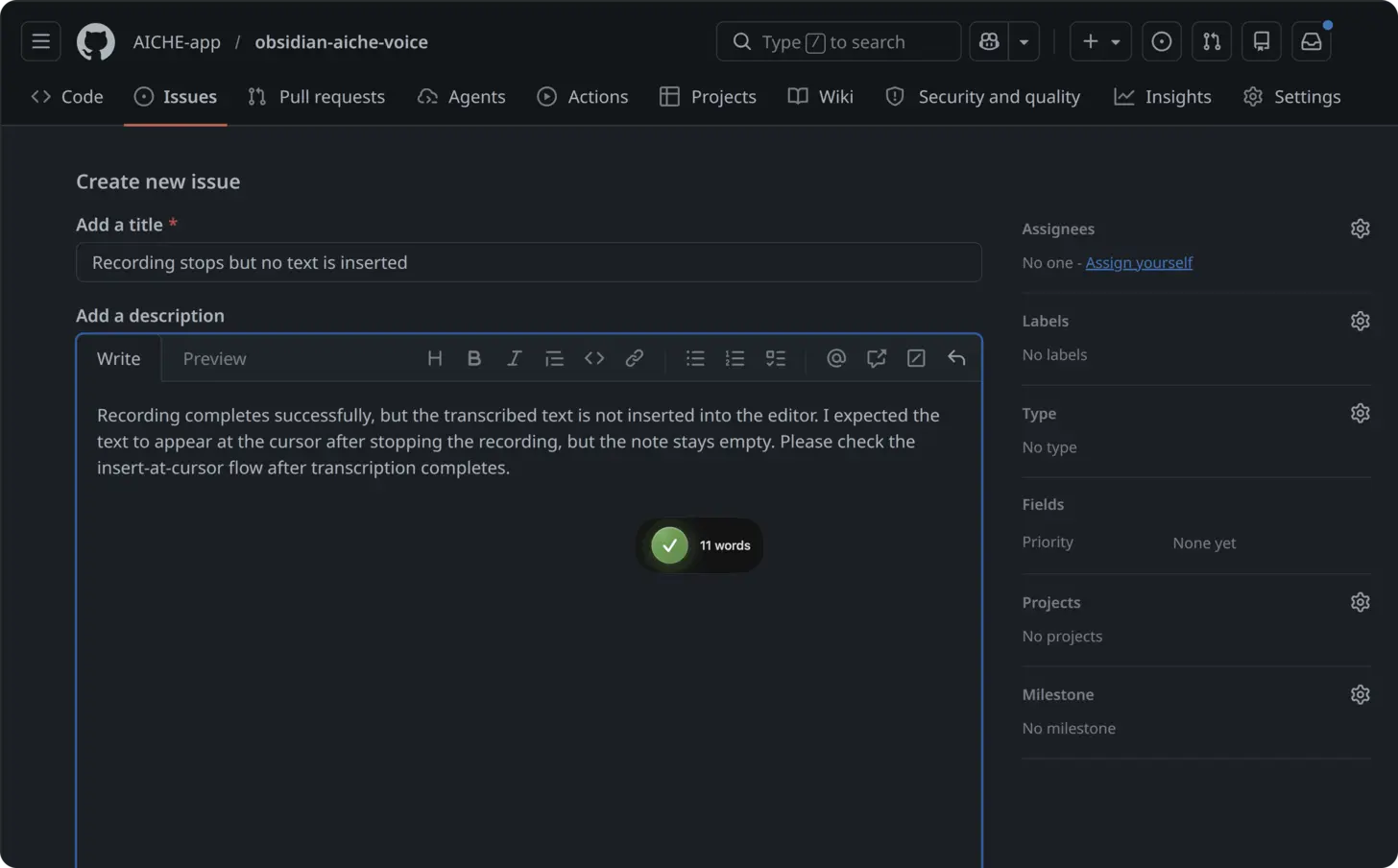
GitHub's value is in the text: PR description quality, review comment threads, issue form completeness, and Discussion posts that future readers can search. Developers still ship "fix bug" commit messages and one-line reviews because a thorough GitHub PR description or review comment takes several minutes of typing in a markdown textarea.
Suggested changes and task lists in markdown do not remove the need for words. CODEOWNERS routes the PR, but someone still has to explain risk. Compare view and draft PR workflows reward early context, yet most descriptions get written at the end when you are tired. Speaking the same content takes tens of seconds; skipping detail is a typing problem, not a GitHub problem.
What Changes
At ~150 spoken words per minute versus ~40 typed, a 200-word GitHub PR description drops from about five minutes of typing to under two minutes of speaking. Review throughput improves because the second comment in a thread is as cheap as the first.
How It Works
- Install AICHE on macOS, Windows, or Linux.
- Open GitHub in a desktop browser (Chrome, Firefox, Safari, or Edge).
- Navigate to a pull request, issue, review, Discussion, or commit message field and click into the textarea.
- Press ⌃+⌥+R (Mac) or Ctrl+Alt+R (Windows/Linux) once to start. Toggle on/off, not push-to-talk.
- Speak your GitHub content: PR description sections, review notes, issue reproduction, or Discussion answer.
- Press the hotkey again. Cloud transcription runs; audio is streamed to Groq, Google Generative AI, or DeepInfra, processed, and discarded after processing.
- Add markdown (headers,
- [ ]task lists, code blocks), preview if the form offers it, submit.
Offline: recordings queue in an encrypted local store and process when connectivity returns. Text inserts when transcription finishes.
Mobile: GitHub's iOS and Android apps do not receive the desktop global hotkey. Record in the AICHE app, copy or sync the note, then paste into GitHub mobile if needed.
Pull Request Descriptions and Draft PRs
Open a draft PR early, click the PR description field, and dictate while the approach is fresh: problem, approach, alternatives considered, test plan, rollout notes. Update the same field as commits land so "Ready for review" does not mean "now write the essay."
For a compare view before opening the PR, paste your dictated summary into the PR body when you create from compare. Structure by speaking in order: What, Why, How to test, Risks. Enable Content Organization in AICHE settings if you want spoken sections broken into paragraphs before you add ## headers.
When CODEOWNERS assigns extra reviewers, dictate a short "@team context" block: areas touched, migrations, feature flags, and what you want from each owner. That reduces drive-by "what is this?" comments.
Review Comment Threads and Suggested Changes
In the Files changed tab, click + on a line to open a review comment thread. Toggle the hotkey and speak specifics: behavior, performance, security, or API contract. GitHub suggested changes still need a human to apply; AICHE only supplies the comment text explaining why.
After leaving suggested changes, dictate the follow-up: what you tested, what you did not test, and what would make you approve. Task lists in markdown (- [ ] / - [x]) are easy to add after insert for "author checklist" style feedback.
Issues, Discussions, and Commit Messages
Issue form: choose the bug or feature template, click each textarea, dictate per section. For bugs, speak reproduction as you replay it: URLs, clicks, expected vs actual. For features, speak problem, workaround, proposed behavior, and constraints.
GitHub Discussions: open a thread, click Comment, dictate a complete answer (concept, steps, pitfalls, doc links). Search ranks thorough Discussions posts; voice makes length affordable.
Commit message field: in the browser, some flows expose a message box; in terminal workflows, open your git commit editor, focus the message buffer, toggle the hotkey, and dictate subject plus body. AICHE does not run git for you; it inserts text into whichever field is focused.
What You Get
- Message Ready formatting for readable paragraphs before you add GitHub markdown.
- Custom Vocabulary for repo names, services, and internal codenames in PR descriptions and reviews.
- Software Development profile (Pro) for identifiers, CLI flags, and library names in review comment threads.
- Smart Insert at the cursor in GitHub textareas without clipboard juggling.
- Zero-retention audio: discarded after processing.
Plans start at $3.99/mo (annual) with a 7-day free trial.
Common Questions
Q: Does AICHE open PRs, approve reviews, or apply suggested changes?
A: No. It inserts text. You click GitHub's buttons and submit reviews yourself.
Q: Does markdown formatting get added automatically?
A: AICHE inserts plain text. Add headers, task lists, and code fences in GitHub's editor after dictation.
Q: Where does transcription run?
A: Cloud-default (Groq, Google Generative AI, or DeepInfra). Audio is discarded after processing. Offline capture queues locally, encrypted, until you are online.
Q: Does it work in GitHub Enterprise Server?
A: Yes, in the browser on desktop, wherever a normal textarea accepts typing and your cursor is focused.
Q: GitHub mobile app hotkey?
A: No system-wide insert there. Use desktop GitHub in a browser for the hotkey workflow, or paste from the AICHE app on mobile.
Related Features
Result: GitHub PR descriptions, review comment threads, and issue forms carry the context your team actually needs, without typing every sentence in the markdown box.
Try it now: open a pull request you owe feedback on, focus the review comment thread, press your hotkey, and dictate the first concrete change you want. See pricing.