CRM updates, call notes, follow-up emails - kill the keyboard tax on selling time
The shape of the day
A field sales rep's Tuesday looks something like this: three discovery calls in the morning, a demo after lunch, and a pipeline review at 4. The calendar is full. The actual selling time is not.
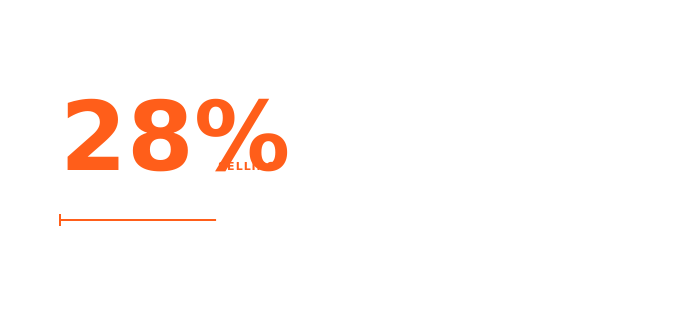
Salesforce's State of Sales report (2024, n=5,500 professionals) found that reps spend only 28% of their week on active selling. The other 72% goes to administrative work: CRM entry, internal meetings, email, scheduling, and prospect research. McKinsey independently confirmed the same 29% selling-time figure in 2023. The gap isn't a news item at this point - it's the structural condition of the job.
Of that administrative burden, CRM data entry is the single biggest time sink. A Forrester activity study tracking 3,031 sales reps put it at roughly 6.8 hours per week - 17% of a 40-hour work week - just typing notes, updating fields, and logging call summaries. Saleslion puts the number differently: 32% of reps spend more than 1 hour per day on data entry. That's 260 hours per year - 6.5 full work weeks - spent on a task that has nothing to do with closing deals.
The irony is that CRM accuracy matters. Research cited by Salesmotion suggests only 23% of CRM data is accurate and complete, and that 27.3% of rep time is wasted following up on bad contact data. The tool designed to save time ends up consuming it, partly because it was built for desktop keyboard workflows - and most CRM updates happen in a car, a hotel lobby, or a parking lot after a call.
Where typing slows you down
The keyboard tax on a rep's day shows up at four specific points.
Post-call note entry. The call ends. You have 5-10 minutes of context in your head - next steps, objections raised, the prospect's actual use case. If you don't capture it immediately, you lose most of it before you get back to your desk. But pulling out a laptop in the parking lot isn't realistic, and typing the same notes on a phone keyboard is slow enough (roughly 40-52 WPM on glass vs. 150 WPM speaking, per Ruan et al., Stanford/UW/Baidu, 2016) that reps either skip it or write bare-minimum notes that don't actually help on the follow-up.
Follow-up email drafting. Yesware's analysis of 10 million email threads found that 80% of deals require five or more follow-ups to close - yet 44% of reps stop after the first attempt. Part of the reason isn't laziness; it's that drafting follow-up email six feels like work when you've already done it five times this week. HubSpot's 2024 Sales Trends Report estimates reps spend about 21% of their day writing emails. That's roughly 1.7 hours of keyboard time that could largely be spoken.
Prospect research notes. Before a call, you pull LinkedIn, the company website, recent news, maybe a Crunchbase entry. You want to capture what matters. Most reps either don't, because there's no fast way to get notes into the CRM before a meeting, or they paste in a wall of text they'll never actually use.
On-the-road capture. Field sales reps make up roughly 71% of the total sales force, and their biggest CRM friction is that mobile data entry is genuinely terrible. The notes that should get logged after a customer site visit often get written up two days later from memory, if at all.
How voice fits this workflow
Voice input isn't a solution for everything in a sales workflow. Some specifics about what works and what doesn't.
What voice actually replaces well:
Post-call notes directly into the CRM text field. After a call ends, open Salesforce/HubSpot/Pipedrive in your browser, place the cursor in the call notes field, press
Ctrl+Alt+R(Windows) or⌃+⌥+R(Mac), and speak the summary. AICHE's Smart Insert drops the cleaned text at the cursor. The AI cleanup handles filler words and punctuation - you can speak at natural talking pace. A 2-minute verbal debrief replaces 10 minutes of typing.Follow-up email drafts. Open your email compose window, cursor in the body, and dictate the email. This is particularly fast for templated emails where the structure is the same but the details change per deal. Speaking runs at around 150 WPM versus roughly 40-65 WPM for most keyboard typists - a 2-3x speed advantage that compounds across dozens of emails per week (per Ruan et al., Stanford/UW/Baidu, 2016).
Prospect research memos. Reading a prospect's LinkedIn summary and want to capture a few key observations? Speak them into a CRM note or a quick voice memo while you're still in the research tab, rather than switching to a text field and typing.
Calendar and task updates. Updating a task description, logging a planned call, writing a brief "what I expect from this meeting" note - any free-text field in your workflow is a candidate.
What voice doesn't replace:
- Navigating the CRM itself - clicking, selecting fields, changing deal stages. You still do that with the mouse.
- Filling in structured fields like dropdown menus, dates, or currency values. Voice works on free-text; structured fields are faster by click.
- Real-time call transcription. If you want a verbatim record of the conversation itself, that's a different tool (see the tradeoffs section).
The practical mental model: voice replaces the free-text typing in your existing workflow; the rest of the workflow stays the same.
AICHE specifically for sales teams
Here are the features that actually matter for a rep's day, and why.
Smart Insert into any text field (desktop + Chrome extension)
AICHE's global hotkey inserts transcribed text wherever your cursor sits - Salesforce in a browser tab, HubSpot's notes panel, Pipedrive's deal view, your email client. No copy-paste step, no switching to a separate app. You place the cursor, press the hotkey, speak, press the hotkey again, and the text is already there. Works in any web-based CRM via the Chrome extension, and in any desktop app via the system-wide hotkey.
AI cleanup for professional tone
Raw dictation sounds like you're talking. The output you want in a CRM note or a prospect email sounds like you're writing. AICHE runs an AI cleanup pass that strips filler words ("um", "uh", "so"), removes false starts, adds punctuation, and structures the text into readable paragraphs. You speak in a natural flow; what lands in the CRM is clean enough to send. You don't need to re-read and edit every entry.
Custom vocabulary for product names and account names
If you sell a product called "CorePath 360" or work with an account called "Tüv Rheinland" or "Böhler-Uddeholm," Whisper (the underlying speech model) will misspell it. AICHE lets you add up to 50 custom vocabulary entries - your product names, your key account names, your internal jargon - and they get applied correctly on every recording, across every device. Add them once, use them everywhere.
Mobile capture for on-the-road reps
On iPhone or Android, tap the mic, speak, save. The app auto-copies to clipboard. For a field rep finishing a customer visit, this is faster than pulling out a laptop: dictate the debrief note into AICHE while walking back to your car, then paste it into the CRM mobile app. The recording is saved even if you lose signal mid-memo - it queues locally and processes when connectivity returns.
Offline recording with auto-queue
Reps work in bad-signal environments: conference center basements, industrial facilities, rural territories. AICHE records locally and encrypts the audio on disk when there's no connection. When signal returns, the queue processes automatically. You don't lose the post-call context you captured in the parking lot with one bar of LTE.
Works where you work - desktop, browser, and mobile
The Chrome extension covers any web-based CRM. The desktop app (macOS and Windows) covers native apps and anything else you work in. iPhone and Android cover on-the-road capture. One subscription (Personal covers 3 devices, Pro covers 10) works across all of them. If your workflow is laptop in the office plus phone in the field, you're covered with one account.
Honest tradeoffs
AICHE is a voice-to-text layer. It is not a call-intelligence platform. The two things often get conflated in "AI for sales" coverage, so it's worth being direct.
Not for call transcription or conversation intelligence. AICHE doesn't record your sales calls. It doesn't capture what the prospect said, integrate with your dialer, or produce a verbatim transcript of the conversation. For meeting transcription, Otter.ai is purpose-built for that. If your team wants full-call recording with AI coaching, keyword flagging, and deal risk analysis, that's Gong or Chorus (ZoomInfo). Those tools exist for exactly that use case, and AICHE doesn't compete there.
Not for compliance-recorded calls. If you work in financial services, insurance, or any industry where call recording is a regulatory requirement, you need a platform with compliance certifications. AICHE has no SOC 2, no FINRA/SEC integration, no compliance logging. It's not the right tool for that context.
Not for navigating or automating your CRM. AICHE inserts text; it doesn't click through menus, change deal stages, or trigger automations. You still operate the CRM yourself. Think of it as a voice replacement for keyboard input, not a CRM automation layer.
Cloud round-trip - audio leaves your device. Audio is streamed to Groq, Google Generative AI, or DeepInfra (named cloud providers) for transcription and discarded after processing. There's no persistent audio storage on AICHE's servers, but audio does leave your machine during processing. If your company has a policy requiring all audio processing to stay on-device, that's a constraint to check with your IT team before adopting.
Desktop app interface is English only. The macOS, Windows, and Chrome extension interfaces are English. Mobile (iPhone and Android) supports 28 languages for the app UI. Voice input and transcription work in 99 languages on all platforms - the English-only restriction is just the menus and settings, not the recording.
Team management requires Pro tier. The Personal plan covers individual reps (3 devices, $4.99/mo or $3.99/mo on the annual plan). If you want a team admin panel, seats, roles, and a unified bill, that's Pro ($9.99/mo or $8.33/mo annual). For a team rollout, you're looking at the Pro tier.
What to try first
The point of trying AICHE isn't to rethink your whole workflow on day one. It's to find the two or three moments in your week where voice input is clearly faster, and start there.
Experiment 1: Post-call note dictation for one week
Pick three calls tomorrow. After each one, before you do anything else, open the CRM deal record in your browser, click into the notes field, and dictate a 60-second summary: what was discussed, what your next step is, any objections flagged. Compare how long that takes against how long your typical note entry takes now. If you're typing notes that look like "Called, left voicemail" because the full version takes too long, this is the experiment that will change that.
Experiment 2: Dictate your follow-up emails for 5 business days
After a call, draft the follow-up email by speaking it rather than typing it. You already know what you want to say - you just said it on the call. AICHE's AI cleanup will handle tone. Your sending time per email will drop and the emails will often be better, because spoken communication tends to be less terse than typed-when-rushed communication.
Experiment 3: On-the-road capture with the mobile app
If you're a field rep, install AICHE on your iPhone or Android. After your next customer visit, while you're still in the parking lot, dictate your debrief: what you observed, what the prospect cares about, what you're following up on. Don't wait until you're at your desk - that's where the detail gets lost. Paste the note into your CRM mobile app when you're back in the car.
Try AICHE
The 7-day free trial doesn't require a credit card. You're not signing up for anything; you're testing whether voice fits your workflow before committing.
See pricing and start the trial at /pricing
Personal plan starts at $3.99/mo (annual) and covers 3 devices - enough for a laptop and a phone. Pro is $8.33/mo (annual), covers 10 devices, and adds team management and priority processing if you're setting this up for a small team.
If the post-call note experiment in week one saves you 30 minutes a day, the math is pretty clear.